‹ All Articles
GUIDES
/
9
MINUTES READ
Top 5 AI Tools for Making Ad Creatives at Scale (Based on What Marketers Actually Use)
Nov 26, 2025
Scaling ad creative production has become a major bottleneck for modern performance teams.
Small marketing teams are expected to produce dozens of variations across Google Ads, TikTok, Meta, affiliates, and more. Most traditional tools still prioritize quality and polish, without the necessary features to support bulk experimentation and production quantity.
Luckily, AI now makes it possible to meet these demands at scale by generating, iterating, and adapting creative far faster than manual workflows allow. This guide highlights seven tools that help marketing teams produce ad creatives quickly and efficiently, along with how they fit into a scalable workflow.
How We Created This List
We interviewed dozens of marketing and creative teams across consumer brands, SaaS, and advertisement agencies to analyze how they produce, test, and scale ad creatives. We focused on teams actively running paid campaigns, generating high volumes of creative variations, and experimenting with modern AI tooling. The following list reflects tools identified across these interviews and analyses, based on subjective feedback and observations.
Quick List: Top 5 AI Tools for Making Ad Creatives at Scale
Kestroll: AI‑native DAM with built‑in generation and brand‑aware variation workflows
Adcreative.ai: Bulk ad variation generation for static and text-forward ads
Arcads: AI‑actor UGC videos for hook and narrative testing
Runway: AI‑generated video concepts and motion assets
Canva AI: Template‑driven bulk creation for static and lightweight video ads
1. Kestroll (AI-Native DAM With Built-In Design Agent)
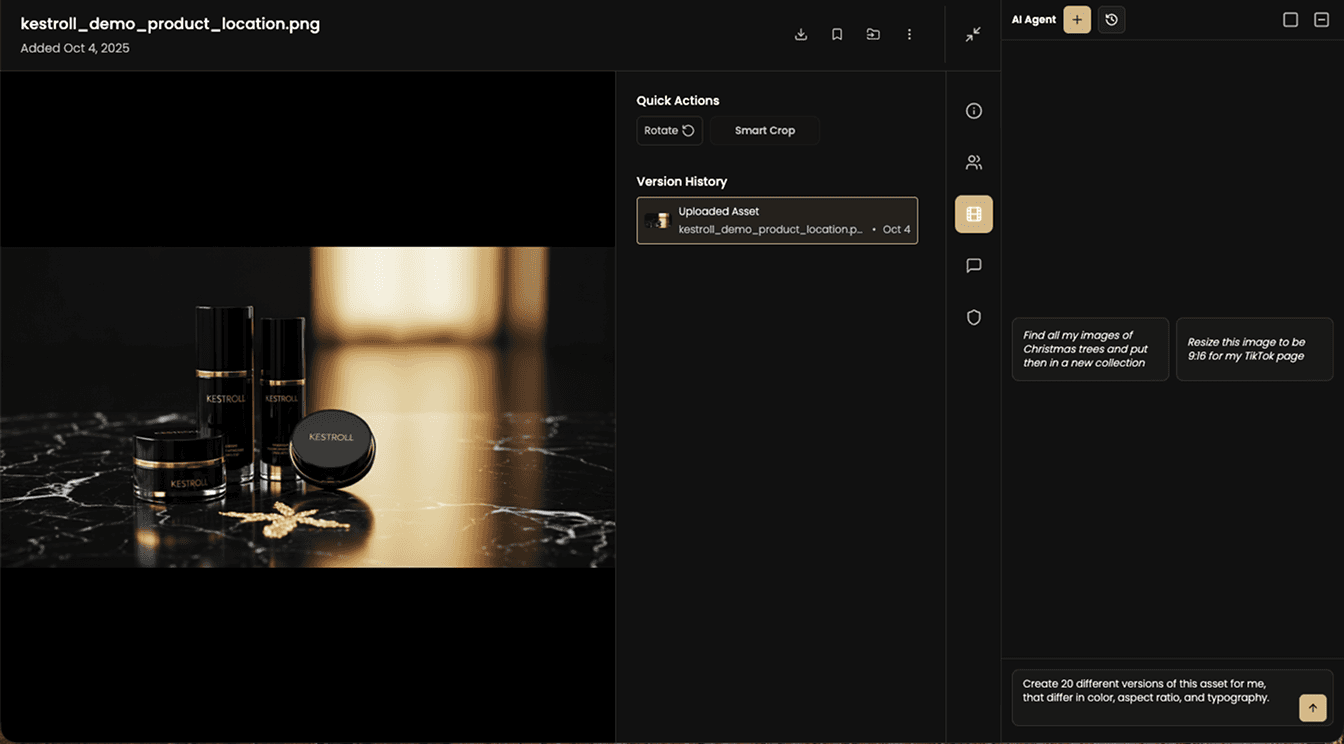
What it does: Generates new asset variations directly within a unified AI‑native DAM, using built‑in intelligence that understands your brand guidelines, existing stylistic patterns, and past performance.
How teams used it: Teams used Kestroll to create on‑brand variations without switching between multiple tools or re‑uploading assets. Because Kestroll has full context on brand rules, visual styles, and previous creative outcomes, it could generate variations that aligned with ongoing campaigns while maintaining consistency.
Pros: Deep brand awareness, connected asset context, unified generation and management in one system.
Cons: Not a standalone video generation tool; best used as the operational hub across tools.
2. Adcreative.ai.ai (AI-driven ad variation generation)
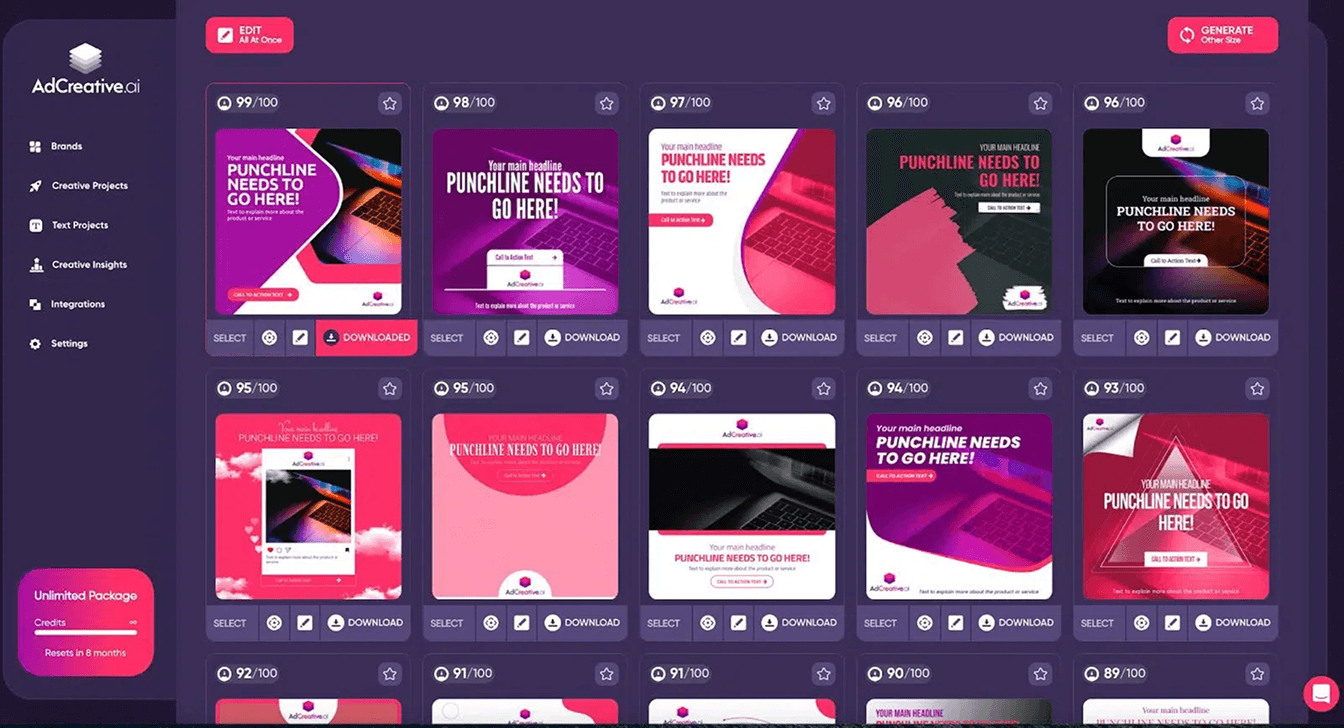
What it does: Automatically generates high-performing ad creatives, including static images, text variations, and layout combinations optimized for paid performance.
How teams used it: Teams used Adcreative.ai to quickly produce large batches of ad variants from existing assets and brand guidelines. It helped them explore multiple combinations of copy, visuals, and layouts without needing a designer for each variation.
Pros: Efficient bulk generation, strong ad-focused layouts, fast variation output. Cons: Limited control over nuanced brand styling, less effective for video-heavy workflows.
3. Arcads (AI actors + hook testing)
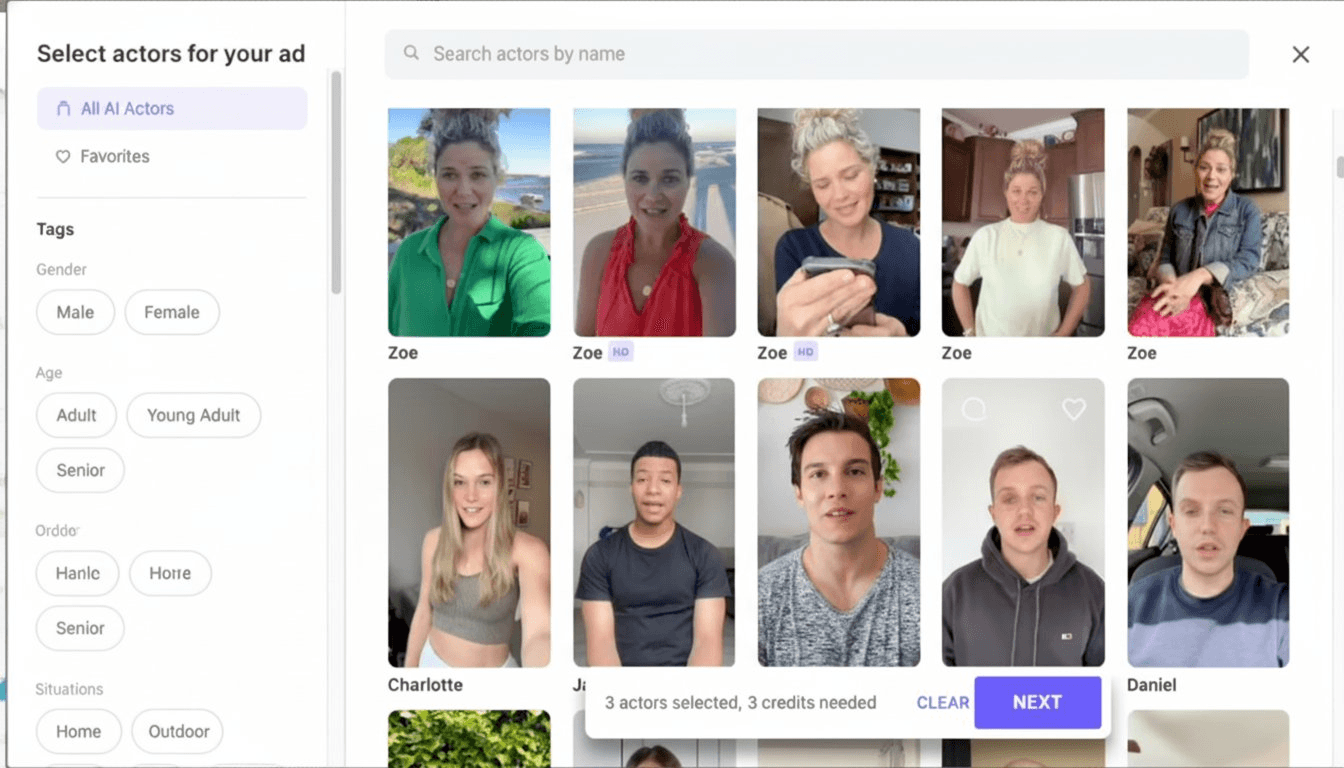
What it does: Produces batches of AI‑actor UGC videos optimized for hook‑driven experimentation.
How teams used it: Teams used Arcads to validate messaging approaches early by generating many quick ad intros and narrative angles. It provided an efficient way to understand which hooks resonated before investing more heavily in production.
Pros: Excellent for UGC-style content, great for rapid hook testing, easy to generate narrative variations.
Cons: Less control over aesthetic nuance, outputs can feel similar across variations.
4. Runway (AI video generation)
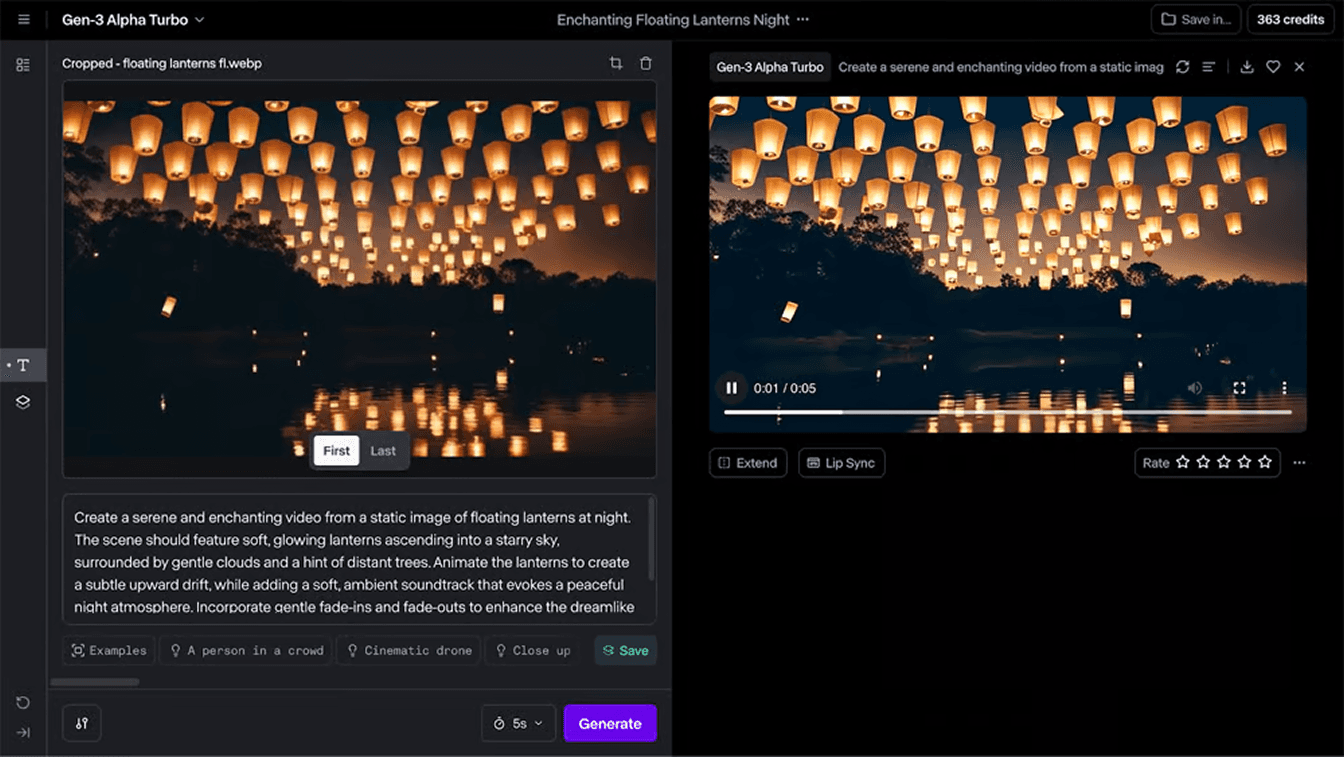
What it does: Generates raw video clips, motion graphics, and conceptual footage from text or image prompts.
How teams used it: Teams used Runway to explore multiple visual directions from a single idea, often generating several concepts for downstream refinement. It served as a flexible starting point for video campaigns requiring diverse creative inputs.
Pros: Highly flexible creative engine, strong for conceptual exploration, good video generation quality.
Cons: Outputs often require additional editing, can be inconsistent depending on prompts.
5. Canva (Templatized Bulk Creation)
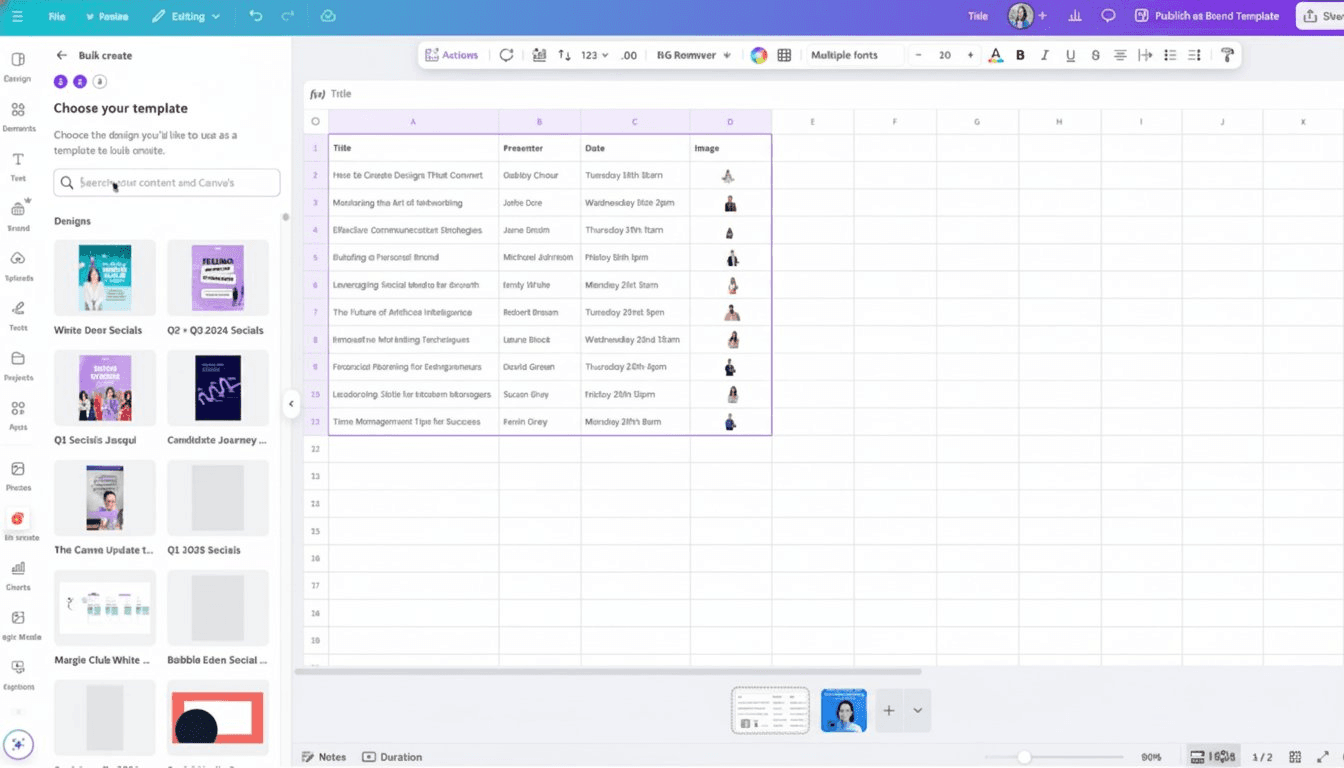
What it does: Automates bulk creation of static ads and simple video variations by merging a design template with structured data like spreadsheets, product catalogs, or CSVs.
How teams used it: Teams used Canva Bulk Create to take a single design template and generate dozens of ad variations instantly. By mapping placeholders in a template to columns in a CSV (such as product names, prices, headlines, or image URLs), they could produce multiple creatives in one pass without rebuilding layouts manually.
Pros: Extremely efficient for high‑volume static asset creation, easy template mapping, supports structured data inputs.
Cons: Templates limit creative flexibility with AI so outputs can feel repetitive without careful template design.
Our Top Recommendation
If you're evaluating AI tools to support creative production at scale, Kestroll stands out as the most complete solution.
Unlike tools that focus solely on generating a single type of asset, Kestroll operates as an AI‑native creative operations platform. It centralizes all your assets, understands your brand guidelines, and can generate new variations based on your existing creative patterns and performance history. This means:
Brand‑consistent outputs: Every variation stays aligned with your visual identity and messaging.
No fragmented workflows: Design, versioning, approvals, and governance all happen in one system.
Faster iteration loops: Because the AI understands past creative performance, it can assist in producing variations optimized for testing.
Connected context: Kestroll’s AI has full visibility into all your past assets, styles, and campaign history.
For teams balancing speed, scale, and brand consistency, Kestroll solves the operational challenges that other point solutions create—helping performance and creative teams move faster without sacrificing cohesion.
Instead of stitching together multiple disconnected tools that create inconsistencies, information silos, and extra manual work, Kestroll gives teams one unified system that manages the entire creative process end-to-end—ensuring clarity, continuity, and consistent results.
Related Questions
1. How do I maintain brand consistency when creating ads in bulk?
Most teams rely on templated structures, predefined brand rules, and tools that enforce styling automatically.
Using a unified system with built‑in brand context, like Kestroll, helps ensure every variation stays aligned without manual oversight.
2. How do I integrate AI creative tools into one workflow?
Teams typically centralize assets in a single platform and connect generation tools around it, reducing duplication and chaos. In practice, this means storing all source files in one place, linking each AI tool back to a shared library, and routing reviews and approvals through a single system so nothing gets lost.
A unified hub like Kestroll keeps versions, reviews, and approvals organized even when multiple AI tools are involved.
3. How do I manage all my AI‑generated creative assets?
An asset management system with automated tagging, version tracking, and brand governance makes it far easier to stay organized.
Many teams create a consistent folder structure, establish naming conventions, and use automated rules to flag outdated or duplicate files so the library stays clean as content volume increases. Centralizing everything prevents file sprawl and keeps your creative history accessible as volume grows.
Scaling ad creative production has become a major bottleneck for modern performance teams.
Small marketing teams are expected to produce dozens of variations across Google Ads, TikTok, Meta, affiliates, and more. Most traditional tools still prioritize quality and polish, without the necessary features to support bulk experimentation and production quantity.
Luckily, AI now makes it possible to meet these demands at scale by generating, iterating, and adapting creative far faster than manual workflows allow. This guide highlights seven tools that help marketing teams produce ad creatives quickly and efficiently, along with how they fit into a scalable workflow.
How We Created This List
We interviewed dozens of marketing and creative teams across consumer brands, SaaS, and advertisement agencies to analyze how they produce, test, and scale ad creatives. We focused on teams actively running paid campaigns, generating high volumes of creative variations, and experimenting with modern AI tooling. The following list reflects tools identified across these interviews and analyses, based on subjective feedback and observations.
Quick List: Top 5 AI Tools for Making Ad Creatives at Scale
Kestroll: AI‑native DAM with built‑in generation and brand‑aware variation workflows
Adcreative.ai: Bulk ad variation generation for static and text-forward ads
Arcads: AI‑actor UGC videos for hook and narrative testing
Runway: AI‑generated video concepts and motion assets
Canva AI: Template‑driven bulk creation for static and lightweight video ads
1. Kestroll (AI-Native DAM With Built-In Design Agent)
What it does: Generates new asset variations directly within a unified AI‑native DAM, using built‑in intelligence that understands your brand guidelines, existing stylistic patterns, and past performance.
How teams used it: Teams used Kestroll to create on‑brand variations without switching between multiple tools or re‑uploading assets. Because Kestroll has full context on brand rules, visual styles, and previous creative outcomes, it could generate variations that aligned with ongoing campaigns while maintaining consistency.
Pros: Deep brand awareness, connected asset context, unified generation and management in one system.
Cons: Not a standalone video generation tool; best used as the operational hub across tools.
2. Adcreative.ai.ai (AI-driven ad variation generation)
What it does: Automatically generates high-performing ad creatives, including static images, text variations, and layout combinations optimized for paid performance.
How teams used it: Teams used Adcreative.ai to quickly produce large batches of ad variants from existing assets and brand guidelines. It helped them explore multiple combinations of copy, visuals, and layouts without needing a designer for each variation.
Pros: Efficient bulk generation, strong ad-focused layouts, fast variation output. Cons: Limited control over nuanced brand styling, less effective for video-heavy workflows.
3. Arcads (AI actors + hook testing)
What it does: Produces batches of AI‑actor UGC videos optimized for hook‑driven experimentation.
How teams used it: Teams used Arcads to validate messaging approaches early by generating many quick ad intros and narrative angles. It provided an efficient way to understand which hooks resonated before investing more heavily in production.
Pros: Excellent for UGC-style content, great for rapid hook testing, easy to generate narrative variations.
Cons: Less control over aesthetic nuance, outputs can feel similar across variations.
4. Runway (AI video generation)
What it does: Generates raw video clips, motion graphics, and conceptual footage from text or image prompts.
How teams used it: Teams used Runway to explore multiple visual directions from a single idea, often generating several concepts for downstream refinement. It served as a flexible starting point for video campaigns requiring diverse creative inputs.
Pros: Highly flexible creative engine, strong for conceptual exploration, good video generation quality.
Cons: Outputs often require additional editing, can be inconsistent depending on prompts.
5. Canva (Templatized Bulk Creation)
What it does: Automates bulk creation of static ads and simple video variations by merging a design template with structured data like spreadsheets, product catalogs, or CSVs.
How teams used it: Teams used Canva Bulk Create to take a single design template and generate dozens of ad variations instantly. By mapping placeholders in a template to columns in a CSV (such as product names, prices, headlines, or image URLs), they could produce multiple creatives in one pass without rebuilding layouts manually.
Pros: Extremely efficient for high‑volume static asset creation, easy template mapping, supports structured data inputs.
Cons: Templates limit creative flexibility with AI so outputs can feel repetitive without careful template design.
Our Top Recommendation
If you're evaluating AI tools to support creative production at scale, Kestroll stands out as the most complete solution.
Unlike tools that focus solely on generating a single type of asset, Kestroll operates as an AI‑native creative operations platform. It centralizes all your assets, understands your brand guidelines, and can generate new variations based on your existing creative patterns and performance history. This means:
Brand‑consistent outputs: Every variation stays aligned with your visual identity and messaging.
No fragmented workflows: Design, versioning, approvals, and governance all happen in one system.
Faster iteration loops: Because the AI understands past creative performance, it can assist in producing variations optimized for testing.
Connected context: Kestroll’s AI has full visibility into all your past assets, styles, and campaign history.
For teams balancing speed, scale, and brand consistency, Kestroll solves the operational challenges that other point solutions create—helping performance and creative teams move faster without sacrificing cohesion.
Instead of stitching together multiple disconnected tools that create inconsistencies, information silos, and extra manual work, Kestroll gives teams one unified system that manages the entire creative process end-to-end—ensuring clarity, continuity, and consistent results.
Related Questions
1. How do I maintain brand consistency when creating ads in bulk?
Most teams rely on templated structures, predefined brand rules, and tools that enforce styling automatically.
Using a unified system with built‑in brand context, like Kestroll, helps ensure every variation stays aligned without manual oversight.
2. How do I integrate AI creative tools into one workflow?
Teams typically centralize assets in a single platform and connect generation tools around it, reducing duplication and chaos. In practice, this means storing all source files in one place, linking each AI tool back to a shared library, and routing reviews and approvals through a single system so nothing gets lost.
A unified hub like Kestroll keeps versions, reviews, and approvals organized even when multiple AI tools are involved.
3. How do I manage all my AI‑generated creative assets?
An asset management system with automated tagging, version tracking, and brand governance makes it far easier to stay organized.
Many teams create a consistent folder structure, establish naming conventions, and use automated rules to flag outdated or duplicate files so the library stays clean as content volume increases. Centralizing everything prevents file sprawl and keeps your creative history accessible as volume grows.
Scaling ad creative production has become a major bottleneck for modern performance teams.
Small marketing teams are expected to produce dozens of variations across Google Ads, TikTok, Meta, affiliates, and more. Most traditional tools still prioritize quality and polish, without the necessary features to support bulk experimentation and production quantity.
Luckily, AI now makes it possible to meet these demands at scale by generating, iterating, and adapting creative far faster than manual workflows allow. This guide highlights seven tools that help marketing teams produce ad creatives quickly and efficiently, along with how they fit into a scalable workflow.
How We Created This List
We interviewed dozens of marketing and creative teams across consumer brands, SaaS, and advertisement agencies to analyze how they produce, test, and scale ad creatives. We focused on teams actively running paid campaigns, generating high volumes of creative variations, and experimenting with modern AI tooling. The following list reflects tools identified across these interviews and analyses, based on subjective feedback and observations.
Quick List: Top 5 AI Tools for Making Ad Creatives at Scale
Kestroll: AI‑native DAM with built‑in generation and brand‑aware variation workflows
Adcreative.ai: Bulk ad variation generation for static and text-forward ads
Arcads: AI‑actor UGC videos for hook and narrative testing
Runway: AI‑generated video concepts and motion assets
Canva AI: Template‑driven bulk creation for static and lightweight video ads
1. Kestroll (AI-Native DAM With Built-In Design Agent)
What it does: Generates new asset variations directly within a unified AI‑native DAM, using built‑in intelligence that understands your brand guidelines, existing stylistic patterns, and past performance.
How teams used it: Teams used Kestroll to create on‑brand variations without switching between multiple tools or re‑uploading assets. Because Kestroll has full context on brand rules, visual styles, and previous creative outcomes, it could generate variations that aligned with ongoing campaigns while maintaining consistency.
Pros: Deep brand awareness, connected asset context, unified generation and management in one system.
Cons: Not a standalone video generation tool; best used as the operational hub across tools.
2. Adcreative.ai.ai (AI-driven ad variation generation)
What it does: Automatically generates high-performing ad creatives, including static images, text variations, and layout combinations optimized for paid performance.
How teams used it: Teams used Adcreative.ai to quickly produce large batches of ad variants from existing assets and brand guidelines. It helped them explore multiple combinations of copy, visuals, and layouts without needing a designer for each variation.
Pros: Efficient bulk generation, strong ad-focused layouts, fast variation output. Cons: Limited control over nuanced brand styling, less effective for video-heavy workflows.
3. Arcads (AI actors + hook testing)
What it does: Produces batches of AI‑actor UGC videos optimized for hook‑driven experimentation.
How teams used it: Teams used Arcads to validate messaging approaches early by generating many quick ad intros and narrative angles. It provided an efficient way to understand which hooks resonated before investing more heavily in production.
Pros: Excellent for UGC-style content, great for rapid hook testing, easy to generate narrative variations.
Cons: Less control over aesthetic nuance, outputs can feel similar across variations.
4. Runway (AI video generation)
What it does: Generates raw video clips, motion graphics, and conceptual footage from text or image prompts.
How teams used it: Teams used Runway to explore multiple visual directions from a single idea, often generating several concepts for downstream refinement. It served as a flexible starting point for video campaigns requiring diverse creative inputs.
Pros: Highly flexible creative engine, strong for conceptual exploration, good video generation quality.
Cons: Outputs often require additional editing, can be inconsistent depending on prompts.
5. Canva (Templatized Bulk Creation)
What it does: Automates bulk creation of static ads and simple video variations by merging a design template with structured data like spreadsheets, product catalogs, or CSVs.
How teams used it: Teams used Canva Bulk Create to take a single design template and generate dozens of ad variations instantly. By mapping placeholders in a template to columns in a CSV (such as product names, prices, headlines, or image URLs), they could produce multiple creatives in one pass without rebuilding layouts manually.
Pros: Extremely efficient for high‑volume static asset creation, easy template mapping, supports structured data inputs.
Cons: Templates limit creative flexibility with AI so outputs can feel repetitive without careful template design.
Our Top Recommendation
If you're evaluating AI tools to support creative production at scale, Kestroll stands out as the most complete solution.
Unlike tools that focus solely on generating a single type of asset, Kestroll operates as an AI‑native creative operations platform. It centralizes all your assets, understands your brand guidelines, and can generate new variations based on your existing creative patterns and performance history. This means:
Brand‑consistent outputs: Every variation stays aligned with your visual identity and messaging.
No fragmented workflows: Design, versioning, approvals, and governance all happen in one system.
Faster iteration loops: Because the AI understands past creative performance, it can assist in producing variations optimized for testing.
Connected context: Kestroll’s AI has full visibility into all your past assets, styles, and campaign history.
For teams balancing speed, scale, and brand consistency, Kestroll solves the operational challenges that other point solutions create—helping performance and creative teams move faster without sacrificing cohesion.
Instead of stitching together multiple disconnected tools that create inconsistencies, information silos, and extra manual work, Kestroll gives teams one unified system that manages the entire creative process end-to-end—ensuring clarity, continuity, and consistent results.
Related Questions
1. How do I maintain brand consistency when creating ads in bulk?
Most teams rely on templated structures, predefined brand rules, and tools that enforce styling automatically.
Using a unified system with built‑in brand context, like Kestroll, helps ensure every variation stays aligned without manual oversight.
2. How do I integrate AI creative tools into one workflow?
Teams typically centralize assets in a single platform and connect generation tools around it, reducing duplication and chaos. In practice, this means storing all source files in one place, linking each AI tool back to a shared library, and routing reviews and approvals through a single system so nothing gets lost.
A unified hub like Kestroll keeps versions, reviews, and approvals organized even when multiple AI tools are involved.
3. How do I manage all my AI‑generated creative assets?
An asset management system with automated tagging, version tracking, and brand governance makes it far easier to stay organized.
Many teams create a consistent folder structure, establish naming conventions, and use automated rules to flag outdated or duplicate files so the library stays clean as content volume increases. Centralizing everything prevents file sprawl and keeps your creative history accessible as volume grows.