Bynder has gained popularity as a leading digital asset management platform known for its polished interface, strong brand management features, and wide adoption among marketing teams. However, many marketing and creative teams are seeking alternatives due to Bynder’s limited AI features, inflexible pricing options, and other core missing functionalities.
This article explores the best Bynder alternatives that address these core limitations and offer other specialized features.
“Before proceeding with this article, you might find it helpful to learn about what an AI-native DAM is, by checking out our comprehensive guide on AI-native DAMs for marketing and creative teams."
Quick List: The 7 Best Bynder Alternatives in 2025
Below is a simple shortlist if you just want the options without the detail:
Kestroll — AI-native DAM for creative operations and content automation
Brandfolder — User-friendly DAM for mid-market marketing teams
MediaValet — Enterprise-grade DAM with strong security and video support
Canto — Simple, intuitive DAM for small to mid-sized teams
Cloudinary — Developer-friendly media pipeline + DAM layer for image/video-heavy products
ImageKit — Developer-first headless DAM
Stockpress — Flexible, budget-friendly DAM for small teams
How We Selected the Best Bynder Alternatives
To identify the strongest Bynder alternatives, we analyzed thousands of user reviews across Reddit, Capterra, G2, and directly spoke with brands currently using Bynder or these other leading DAMs. The following list of criteria are based on frequently cited limitations of Bynder and the most commonly mentioned requirements from teams evaluating DAM platforms:
1. AI Capability & Automation
We looked at how well each platform applies AI to support real workflows, including smart metadata, automated organization, content recommendations, version handling, asset variation, or workflow routing.
2. Pricing Flexibility
We prioritized tools with transparent pricing, scalable plans, and options that make sense for different team sizes, from small creative teams to large enterprise environments.
3. Workflow & Platform Adaptability
We assessed how easily each tool fits into modern creative and marketing stacks. This includes API access, webhook support, file-type coverage, integration quality, and the ability to support different departments or teams.
4. Ease of Use & Team Adoption
We favored platforms that are intuitive, simple to onboard, and easy for non-technical teams to adopt without heavy training or complex setup.
1. Kestroll (AI-Native DAM for Creative Operations)
A next-generation, AI-native DAM that centralizes, organizes, and governs all creative assets with a built-in AI agent that handles operational busy-work and automates bulk workflows.
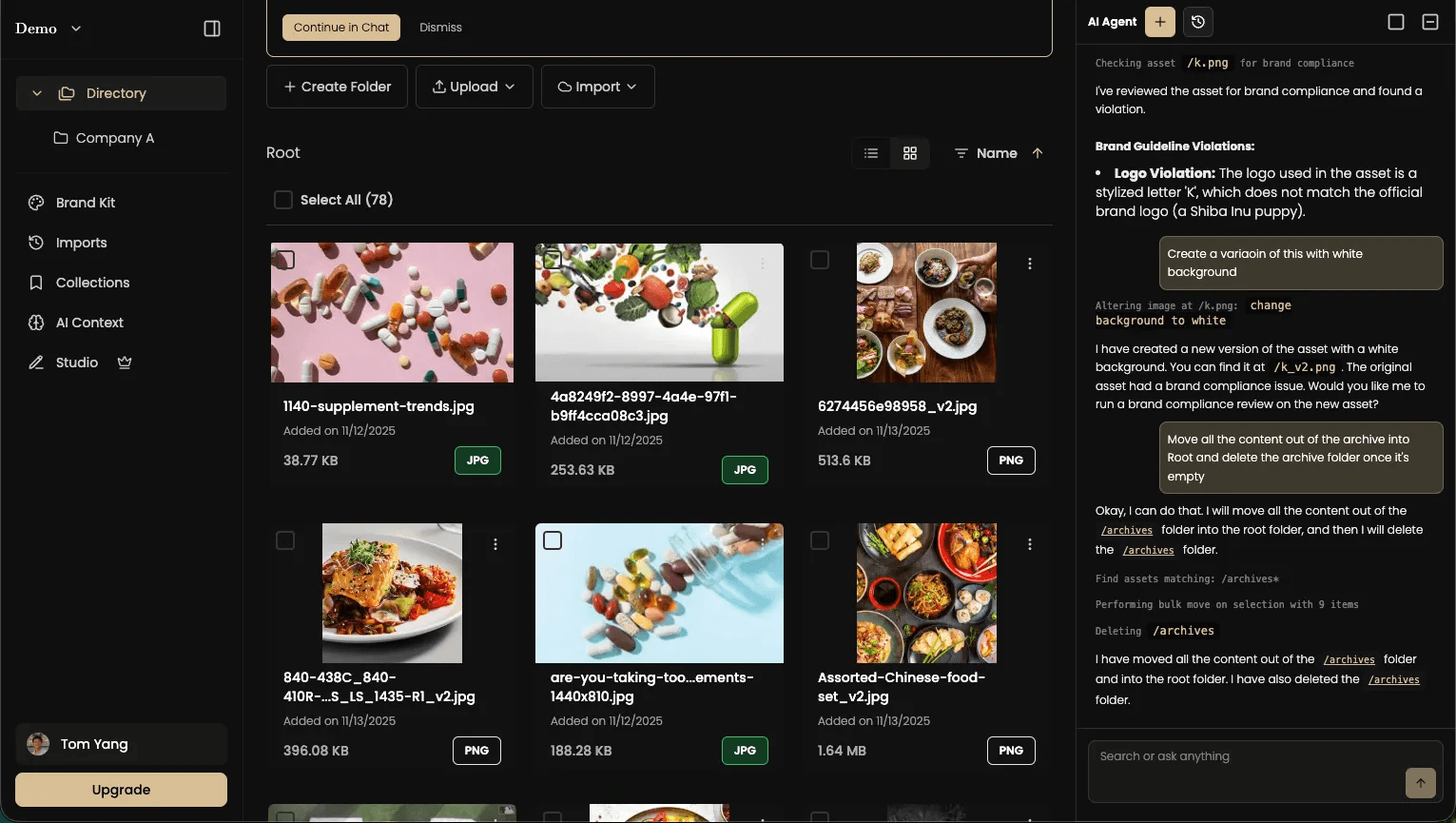
Best for: In-house creative teams and marketing agencies managing high volumes of image and video assets, lengthy brand review processes, and complex workflows for asset labeling, organization, sharing, and versioning.
Pros: Deep AI intelligence, unified creative ops workflows, built-in asset editing and version control, strong multi-media support.
Cons: No developer-first API exposure or headless access.
Kestroll vs. Bynder
Kestroll is AI-native with built-in intelligence and automation, while Bynder requires manual taxonomy setup and workflow configuration. Teams choose Kestroll for automated organization and reduced busy-work over Bynder's multi-region compatibility.
Kestroll vs. Bynder Strengths
Kestroll and Bynder both provide DAM capabilities for marketing and creative teams, but Kestroll differentiates through its AI-native architecture and automated workflows. Key advantages include:
Feature | Kestroll | Bynder |
|---|---|---|
Intelligence | Built-in AI agent with holistic context that can answer questions, route approvals, field requests, and handle delegated tasks | No built-in AI with context to the assets and workspace |
Workflow Automation | Agentic workflows for bulk operations, automatic organization, version control, and asset lifecycle management | Manual workflow configuration; limited automation capabilities |
Asset Searchability | Natural language and visual similarity search over image and video content without requiring manual tagging | Keyword and metadata-based search; requires structured tagging |
Asset Editing | Built-in brand-aware light editing tools and AI-powered variation generation | Requires external editing tools; limited in-platform editing |
Video Support | Deep video understanding, automatic transcription, chaptering, scene detection, and searchable video content | Basic video storage and playback; limited video-specific features |
Onboarding Speed | White-glove asset migration, workspace configuration, and custom workflow setup in weeks | Longer implementation cycle requiring taxonomy setup and training that can take months |
Cost | Self-serve pricing scaled to team size and usage with enterprise option available based on need | Higher enterprise pricing tiers with less flexibility |
Self-Serve Access | Full self-serve sign-up and onboarding without sales calls | Requires enterprise sales process and demos before access |
Kestroll is typically chosen by fast-moving teams who want a quick onboarding process and an AI-first approach that reduces manual asset management work and enables creative teams to focus on strategy and production rather than organization and governance.
Kestroll vs. Bynder Limitations
Currently only available in English
Fewer prebuilt integrations; bespoke integrations upon request
2. Brandfolder (User-Friendly DAM for Mid-Market Teams)
A popular DAM known for ease of use, intuitive UI, and strong brand asset management features.

Best for: Marketing teams, agencies, and mid-sized brands needing a simple, centralized place for all brand assets.
Pros: Easy onboarding, strong sharing features, clean UI, widely adopted by marketing teams.
Cons: Limited customization for complex workflows; less suited for enterprise-scale metadata needs.
Brandfolder vs. Bynder
Brandfolder prioritizes simplicity over configuration complexity. Teams choose Brandfolder for day-one usability without training or IT support, trading Bynder's deeper customization for faster adoption.
Brandfolder vs. Bynder Strengths
Both Brandfolder and Bynder help teams organize and manage brand assets, but Brandfolder tends to stand out in usability and day‑to‑day workflow simplicity. Key advantages include:
Feature | Brandfolder | Bynder |
|---|---|---|
Ease of Use | Extremely intuitive UI; fast onboarding | More complex interface with deeper configuration |
Sharing & Portals | Simple external sharing, collections, and portals | More enterprise control but heavier setup |
Adoption Across Teams | Non-technical users can become productive quickly | Often requires training for marketing + creative teams |
Speed to Value | Quick implementation with minimal configuration | Longer implementation with more customization |
Brandfolder is typically chosen by teams who want a DAM that "just works"—without the overhead of maintaining complex taxonomies or workflows.
Brandfolder vs. Bynder Limitations
While Brandfolder is easier to use, it comes with trade-offs compared to Bynder:
Less customizable metadata structures
Limited complex workflow automation
Weaker governance controls for enterprises
Not ideal for organizations with deep taxonomy or compliance needs
Teams choose Brandfolder over Bynder when usability and simplicity matter more than advanced metadata, governance, or enterprise workflow complexity.
3. MediaValet (Enterprise DAM for Global Teams)
A robust, enterprise-grade DAM with global CDN, strong security, and deep video support.
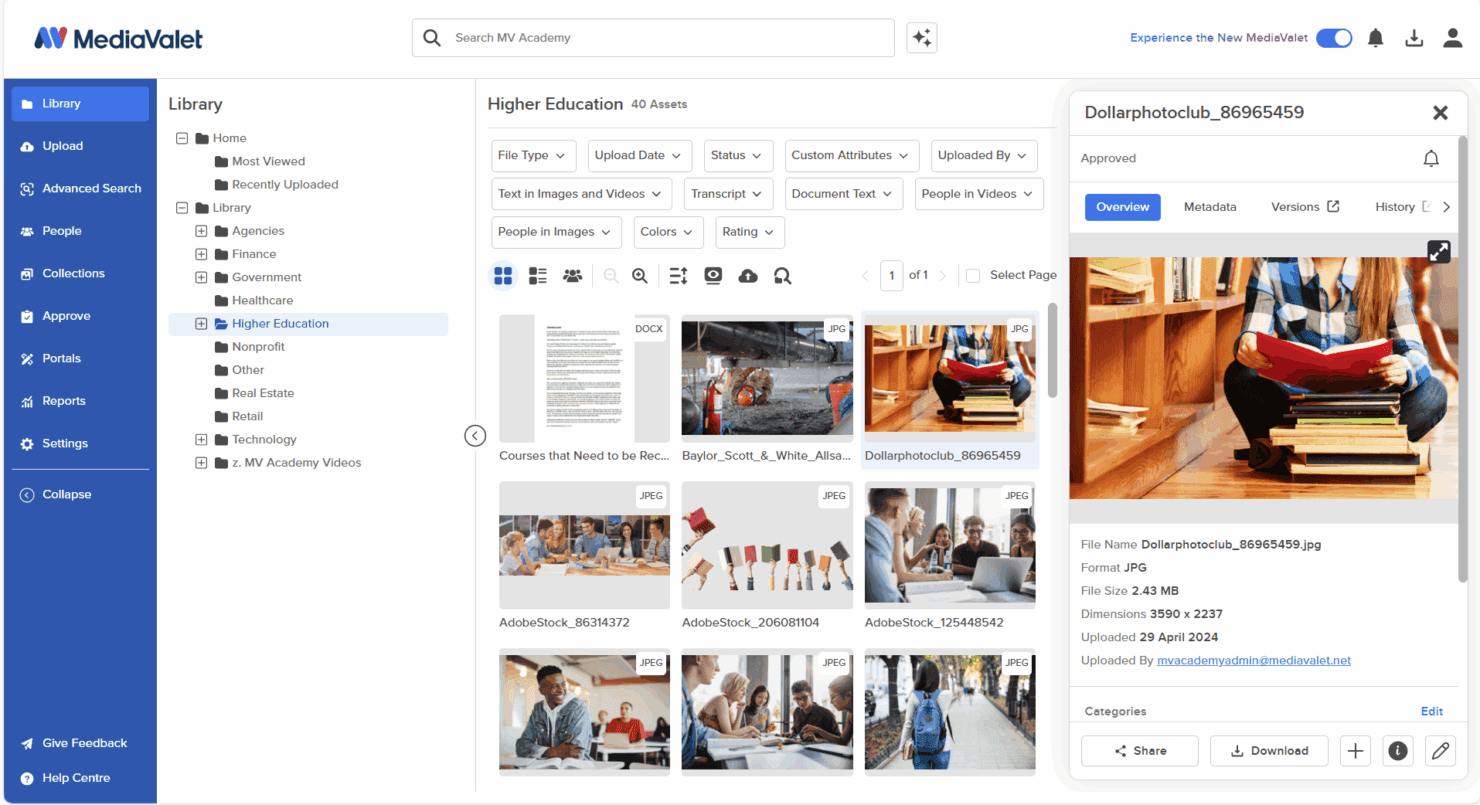
Best for: Large organizations with global operations, extensive media libraries, and heavy video usage.
Pros: Excellent video support, strong security/compliance, large-scale CDN delivery, enterprise metadata.
Cons: Higher cost; more configuration effort required.
MediaValet vs. Bynder
MediaValet excels at enterprise scale with deeper video support, stronger security, and global CDN performance. Teams choose MediaValet for large distributed operations, trading higher cost and configuration effort for superior video and compliance capabilities.
MediaValet vs. Bynder Strengths
MediaValet and Bynder both support enterprise DAM needs, but MediaValet often excels in scale, video handling, and security. Key strengths include:
Feature | MediaValet | Bynder |
|---|---|---|
Video Support | Deep video management, transcoding, CDN delivery | Solid video support but less specialized |
Security & Compliance | Strong enterprise security and governance | Enterprise-grade but less robust for regulated industries |
Global Performance | Built on Azure with global CDN | Global presence but less video-focused |
Scalability | Handles extremely large libraries well | Scales well but with higher configuration needs |
MediaValet is typically selected by large organizations with global content operations and heavy video requirements.
MediaValet vs. Bynder Limitations
MediaValet’s enterprise power brings some downsides:
Higher cost than Bynder for many teams
More configuration needed during setup
Heavier platform for smaller organizations
Teams choose MediaValet when enterprise security, global distribution, and advanced video workflows outweigh ease-of-use considerations.
4. Canto (Simple, Balanced DAM for Smaller Teams)
A straightforward, easy-to-adopt DAM well-suited for small to mid-sized organizations.
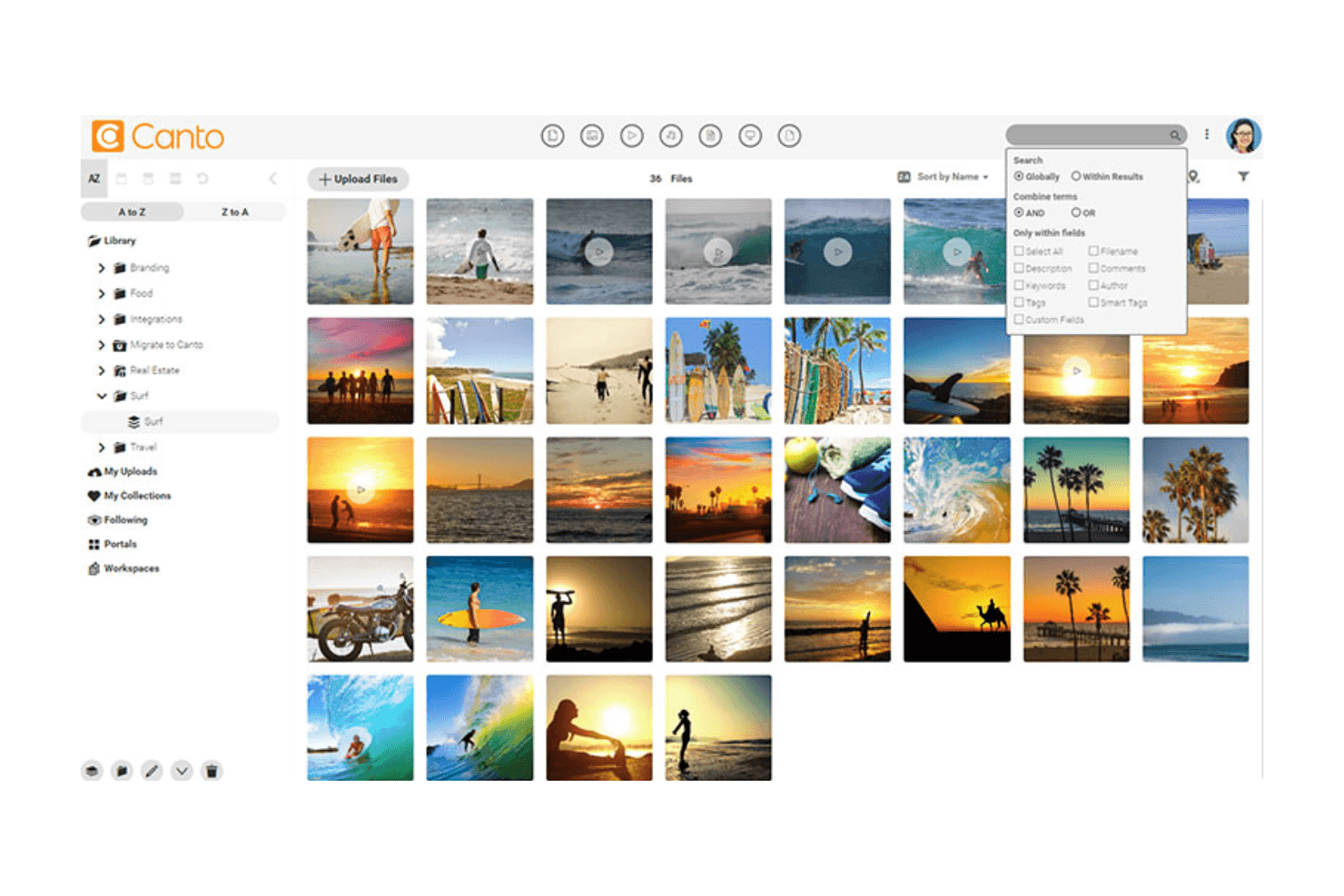
Best for: Teams that need solid DAM fundamentals without enterprise complexity.
Pros: Simple to use, good search, clean organization structure.
Cons: Limited advanced metadata or workflow capabilities.
Canto vs. Bynder
Canto offers DAM fundamentals without enterprise complexity. Teams choose Canto for an affordable, straightforward system with quick adoption, trading Bynder's deep metadata and governance for simplicity.
Canto vs. Bynder Strengths
Canto and Bynder both support brand asset management, but Canto stands out in simplicity and ease of adoption. Key strengths include:
Feature | Canto | Bynder |
|---|---|---|
Ease of Use | Very beginner-friendly | More complex for new users |
Onboarding Speed | Quick setup, minimal training | Requires more structured implementation |
Cost | Generally more affordable | Higher pricing tiers |
Team Adoption | High for marketing and creative teams | Mixed depending on workflow complexity |
Canto is often chosen by teams that want a straightforward DAM without enterprise overhead.
Canto vs. Bynder Limitations
Canto’s simplicity can create limitations:
Less customizable metadata
Limited workflow automation
Not ideal for teams with complex governance needs
Teams choose Canto when they want an easy, reliable DAM rather than a deeply configurable enterprise system.
5. Cloudinary (Developer-Friendly DAM + Media Pipeline)
A media management, optimization, and delivery platform with DAM capabilities baked in.
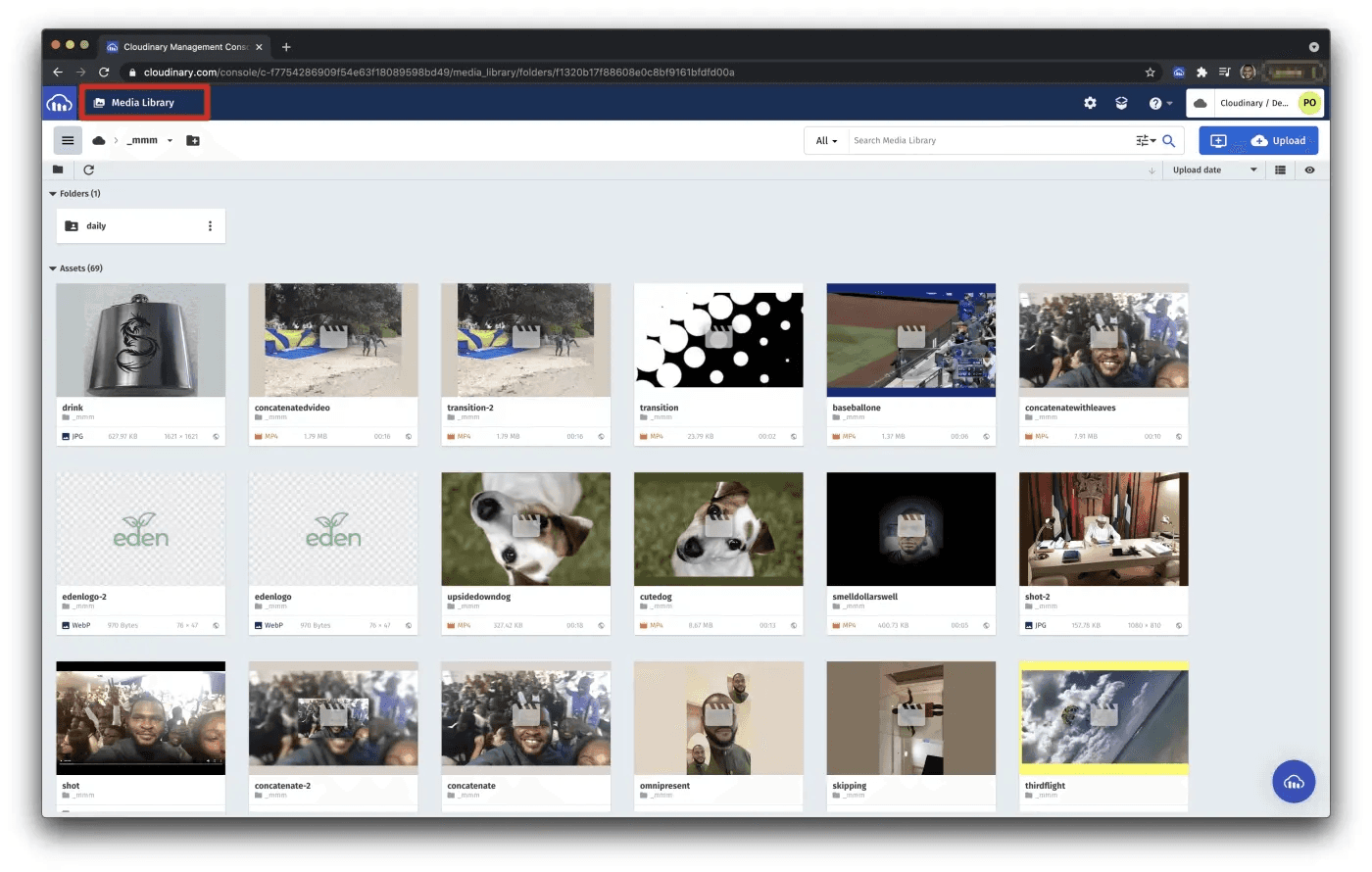
Best for: Products that rely on dynamic images/videos, SaaS companies, and developer-led teams.
Pros: Real-time transformations, video processing, global CDN, excellent developer tooling.
Cons: Not built for marketing or creative ops; lacks UI-driven workflows and governance.
Cloudinary vs. Bynder
Cloudinary is a media optimization platform, not a traditional DAM. Teams choose Cloudinary for real-time transformations and developer-focused APIs over Bynder's marketing workflows and UI-driven governance.
Cloudinary vs. Bynder Strengths
Cloudinary and Bynder serve very different needs. Cloudinary excels in media delivery, automation, and developer tooling. Key strengths include:
Feature | Cloudinary | Bynder |
|---|---|---|
Media Optimization | Market-leading transformations | Not built for real-time ops |
Developer Tools | Extensive APIs, SDKs, automation | Limited dev tooling |
Video Processing | Advanced, automated workflows | Basic video handling |
Performance Delivery | Global CDN + responsive delivery | Asset hosting but not optimized |
Cloudinary is popular with SaaS, product, engineering, and content-heavy digital teams.
Cloudinary vs. Bynder Limitations
Cloudinary’s strengths are also its constraints:
Not built for creative or marketing team workflows
No advanced governance or approval systems
Can become expensive at scale depending on transformations
Teams choose Cloudinary when they need a media pipeline over a traditional DAM.
6. ImageKit (Developer-First + Headless DAM)
An API-driven media optimization and delivery platform with lightweight DAM capabilities.
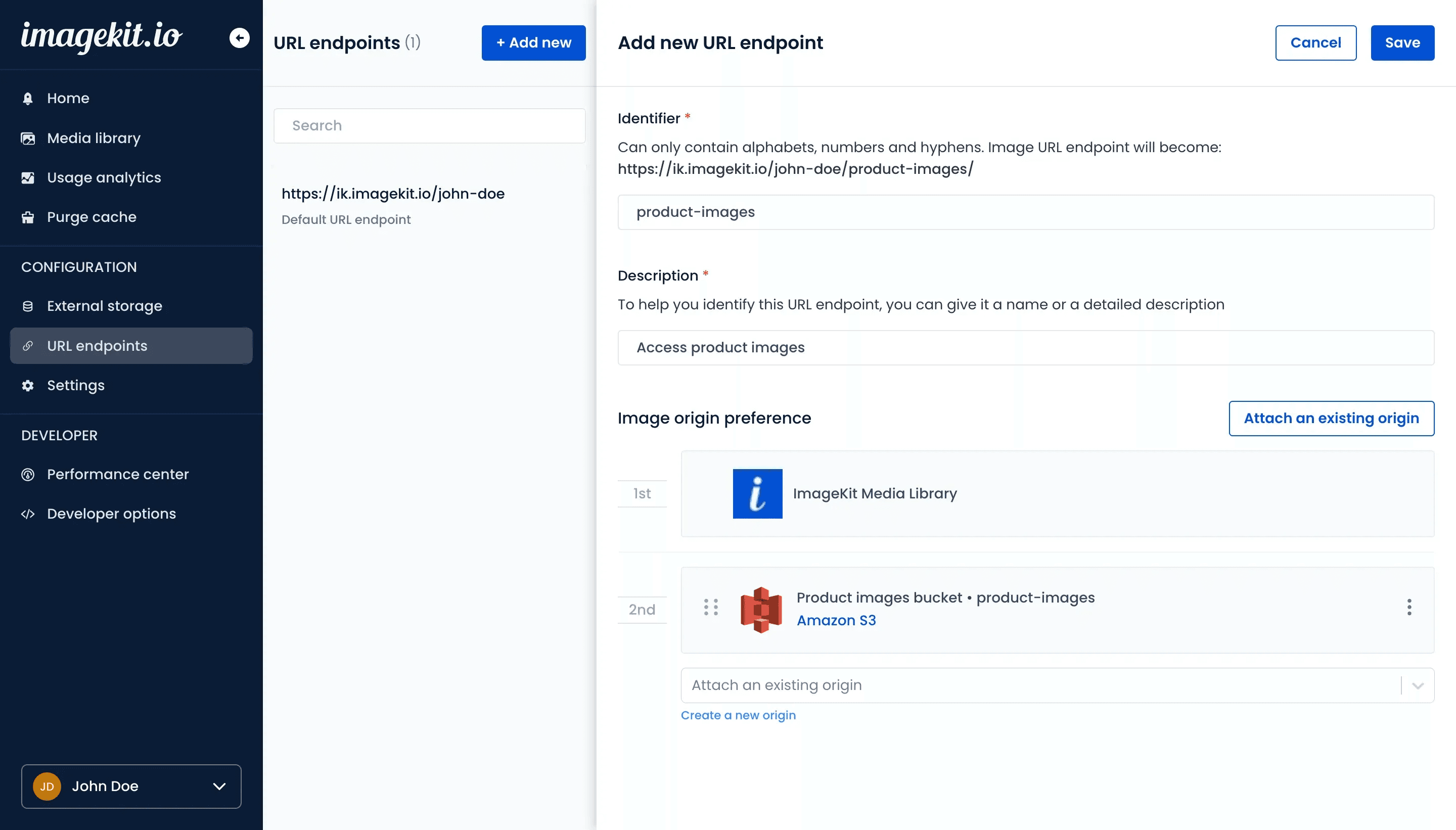
Best for: Technical and developer-led teams with content-heavy platforms that need fast media delivery and API-first workflows.
Pros: Affordable, customizable, strong image optimization.
Cons: Not suited for enterprise DAM needs, non-technical users, or advanced workflows.
ImageKit vs. Bynder
ImageKit is a headless, API-first DAM platform for developers. Teams choose ImageKit for programmatic control and real-time transformations over Bynder's marketing workflows and governance.
ImageKit vs. Bynder Strengths
ImageKit and Bynder serve fundamentally different users. ImageKit excels where development flexibility and automated media pipelines matter most.
Feature | ImageKit | Bynder |
|---|---|---|
API-First Architecture | Core value; simple, powerful APIs + SDKs | Limited developer tooling |
Headless Media Pipeline | Optimizes & delivers assets directly via CDN | Not designed for this |
Integration with External Storage | Easy connection to S3, GCP, Azure | Requires import into the DAM |
Performance Delivery | Real-time optimization + global CDN | Standard asset hosting |
Teams choose ImageKit when they want a headless, developer-friendly system that becomes part of their product infrastructure instead of a traditional DAM UI.
ImageKit vs. Bynder Limitations
ImageKit’s strengths make it less suitable for teams seeking traditional DAM capabilities:
Very limited metadata and taxonomy management
Minimal workflow or approval processes
DAM UI is lightweight and secondary to its API layer
Not designed for marketing or creative-ops teams without engineering support
Teams choose ImageKit when they need fast, API-powered media performance — not structured asset governance or enterprise workflows.
7. Stockpress (Affordable, Flexible DAM)
A lightweight DAM for teams that need core asset management without enterprise overhead.
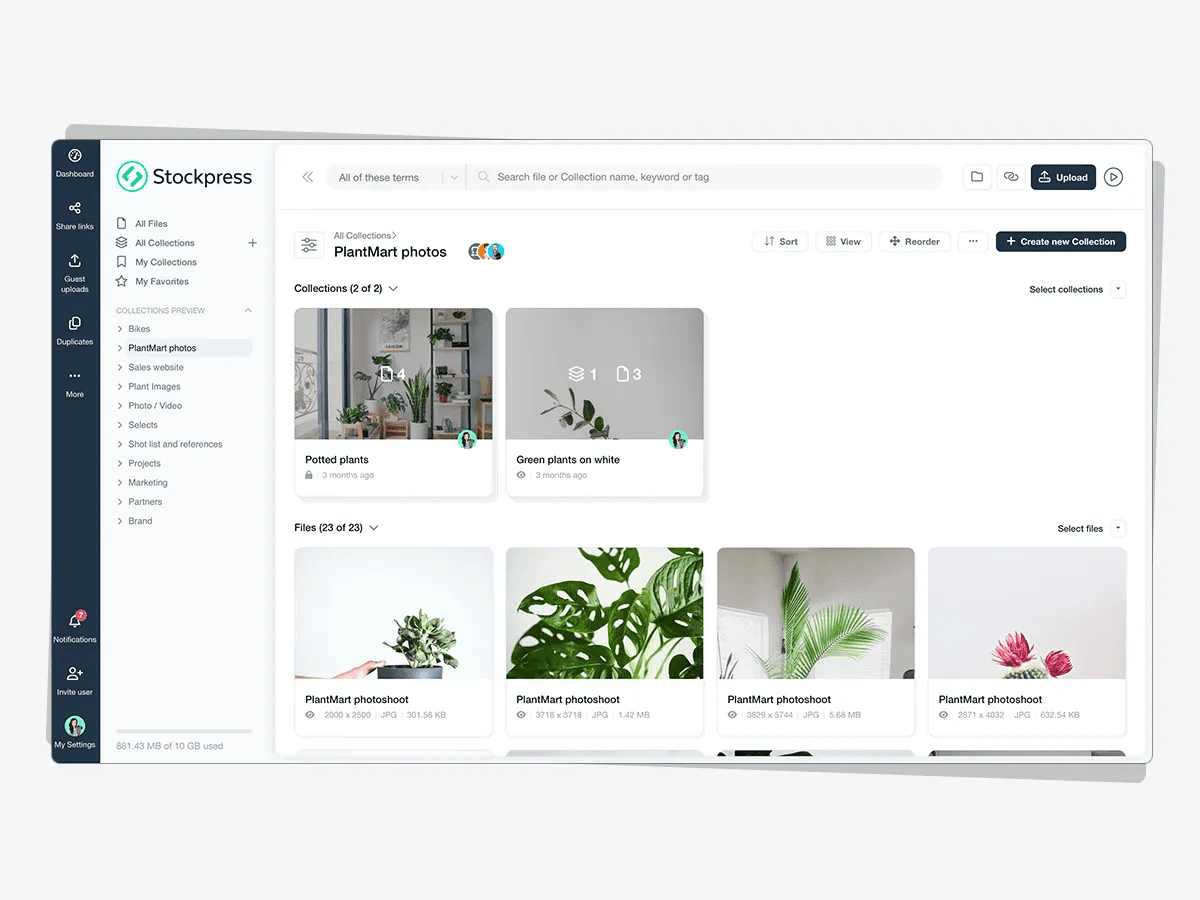
Best for: Startups, small teams, agencies, and teams needing basic storage + tagging + sharing.
Pros: Cost-effective, flexible, minimal setup.
Cons: Limited metadata depth; fewer enterprise features.
Stockpress vs. Bynder
Stockpress is a lightweight, budget-friendly DAM for basic storage and sharing. Teams choose Stockpress for affordability and simplicity, trading Bynder's enterprise features for easy setup.
Stockpress vs. Bynder Strengths
Stockpress is designed for teams that want an accessible DAM with minimal friction, while Bynder is tailored for enterprises requiring deeper structure and governance.
Feature | Stockpress | Bynder |
|---|---|---|
Cost | Very budget-friendly | Higher enterprise pricing |
Ease of Setup | Minimal configuration required | More complex implementation |
Flexibility | Adaptable, lightweight structure | Rigid enterprise frameworks |
Team Adoption | Easy for non-technical users | Requires training for many teams |
Stockpress is typically chosen by teams who want something simple that “just works,” rather than a fully governed enterprise DAM.
Stockpress vs. Bynder Limitations
Stockpress’s simplicity brings trade-offs:
Weaker metadata structure and taxonomy capabilities
Limited workflow automation
Fewer enterprise governance or compliance features
Not built for large global organizations
Teams choose Stockpress when they need a no-frills DAM for basic organization and sharing, not a heavy enterprise system.
Our Top Recommendation
If you're evaluating DAM solutions for 2025 and want the most forward-thinking option, Kestroll is the strongest choice.
Unlike traditional DAMs that focus only on asset storage and search, Kestroll is an AI-native system that understands your brand guidelines, creative history, and asset structures. It automatically organizes your library, generates new variations, suggests the best assets to reuse, and supports end-to-end creative workflows.
Kestroll is the only platform on this list that unifies:
Asset storage + governance
Brand-aware AI editing and generation
Automated reviews and workflows
Unified versioning and content lifecycle management
For teams producing high creative volume across both image and video, Kestroll offers clarity, automation, and consistency that legacy DAMs and media pipelines can’t provide.
Related Questions
1. How do I know which DAM is right for my team?
Choose based on your team’s size, creative output volume, and workflow needs. If you need governance + AI automation, choose Kestroll; if you need simplicity, choose Canto; if you need enterprise scale, choose MediaValet.
2. What’s the difference between a DAM and a media optimization tool?
Tools like Cloudinary and ImageKit focus on transformations and delivery; DAMs focus on asset governance, tagging, collaboration, and brand workflows.
3. Do DAMs work with AI tools I already use?
Most modern DAMs integrate with external creative tools, but AI-native DAMs like Kestroll use context from your entire asset library to improve automation and generation.
Bynder has gained popularity as a leading digital asset management platform known for its polished interface, strong brand management features, and wide adoption among marketing teams. However, many marketing and creative teams are seeking alternatives due to Bynder’s limited AI features, inflexible pricing options, and other core missing functionalities.
This article explores the best Bynder alternatives that address these core limitations and offer other specialized features.
“Before proceeding with this article, you might find it helpful to learn about what an AI-native DAM is, by checking out our comprehensive guide on AI-native DAMs for marketing and creative teams."
Quick List: The 7 Best Bynder Alternatives in 2025
Below is a simple shortlist if you just want the options without the detail:
Kestroll — AI-native DAM for creative operations and content automation
Brandfolder — User-friendly DAM for mid-market marketing teams
MediaValet — Enterprise-grade DAM with strong security and video support
Canto — Simple, intuitive DAM for small to mid-sized teams
Cloudinary — Developer-friendly media pipeline + DAM layer for image/video-heavy products
ImageKit — Developer-first headless DAM
Stockpress — Flexible, budget-friendly DAM for small teams
How We Selected the Best Bynder Alternatives
To identify the strongest Bynder alternatives, we analyzed thousands of user reviews across Reddit, Capterra, G2, and directly spoke with brands currently using Bynder or these other leading DAMs. The following list of criteria are based on frequently cited limitations of Bynder and the most commonly mentioned requirements from teams evaluating DAM platforms:
1. AI Capability & Automation
We looked at how well each platform applies AI to support real workflows, including smart metadata, automated organization, content recommendations, version handling, asset variation, or workflow routing.
2. Pricing Flexibility
We prioritized tools with transparent pricing, scalable plans, and options that make sense for different team sizes, from small creative teams to large enterprise environments.
3. Workflow & Platform Adaptability
We assessed how easily each tool fits into modern creative and marketing stacks. This includes API access, webhook support, file-type coverage, integration quality, and the ability to support different departments or teams.
4. Ease of Use & Team Adoption
We favored platforms that are intuitive, simple to onboard, and easy for non-technical teams to adopt without heavy training or complex setup.
1. Kestroll (AI-Native DAM for Creative Operations)
A next-generation, AI-native DAM that centralizes, organizes, and governs all creative assets with a built-in AI agent that handles operational busy-work and automates bulk workflows.
Best for: In-house creative teams and marketing agencies managing high volumes of image and video assets, lengthy brand review processes, and complex workflows for asset labeling, organization, sharing, and versioning.
Pros: Deep AI intelligence, unified creative ops workflows, built-in asset editing and version control, strong multi-media support.
Cons: No developer-first API exposure or headless access.
Kestroll vs. Bynder
Kestroll is AI-native with built-in intelligence and automation, while Bynder requires manual taxonomy setup and workflow configuration. Teams choose Kestroll for automated organization and reduced busy-work over Bynder's multi-region compatibility.
Kestroll vs. Bynder Strengths
Kestroll and Bynder both provide DAM capabilities for marketing and creative teams, but Kestroll differentiates through its AI-native architecture and automated workflows. Key advantages include:
Feature | Kestroll | Bynder |
|---|---|---|
Intelligence | Built-in AI agent with holistic context that can answer questions, route approvals, field requests, and handle delegated tasks | No built-in AI with context to the assets and workspace |
Workflow Automation | Agentic workflows for bulk operations, automatic organization, version control, and asset lifecycle management | Manual workflow configuration; limited automation capabilities |
Asset Searchability | Natural language and visual similarity search over image and video content without requiring manual tagging | Keyword and metadata-based search; requires structured tagging |
Asset Editing | Built-in brand-aware light editing tools and AI-powered variation generation | Requires external editing tools; limited in-platform editing |
Video Support | Deep video understanding, automatic transcription, chaptering, scene detection, and searchable video content | Basic video storage and playback; limited video-specific features |
Onboarding Speed | White-glove asset migration, workspace configuration, and custom workflow setup in weeks | Longer implementation cycle requiring taxonomy setup and training that can take months |
Cost | Self-serve pricing scaled to team size and usage with enterprise option available based on need | Higher enterprise pricing tiers with less flexibility |
Self-Serve Access | Full self-serve sign-up and onboarding without sales calls | Requires enterprise sales process and demos before access |
Kestroll is typically chosen by fast-moving teams who want a quick onboarding process and an AI-first approach that reduces manual asset management work and enables creative teams to focus on strategy and production rather than organization and governance.
Kestroll vs. Bynder Limitations
Currently only available in English
Fewer prebuilt integrations; bespoke integrations upon request
2. Brandfolder (User-Friendly DAM for Mid-Market Teams)
A popular DAM known for ease of use, intuitive UI, and strong brand asset management features.
Best for: Marketing teams, agencies, and mid-sized brands needing a simple, centralized place for all brand assets.
Pros: Easy onboarding, strong sharing features, clean UI, widely adopted by marketing teams.
Cons: Limited customization for complex workflows; less suited for enterprise-scale metadata needs.
Brandfolder vs. Bynder
Brandfolder prioritizes simplicity over configuration complexity. Teams choose Brandfolder for day-one usability without training or IT support, trading Bynder's deeper customization for faster adoption.
Brandfolder vs. Bynder Strengths
Both Brandfolder and Bynder help teams organize and manage brand assets, but Brandfolder tends to stand out in usability and day‑to‑day workflow simplicity. Key advantages include:
Feature | Brandfolder | Bynder |
|---|---|---|
Ease of Use | Extremely intuitive UI; fast onboarding | More complex interface with deeper configuration |
Sharing & Portals | Simple external sharing, collections, and portals | More enterprise control but heavier setup |
Adoption Across Teams | Non-technical users can become productive quickly | Often requires training for marketing + creative teams |
Speed to Value | Quick implementation with minimal configuration | Longer implementation with more customization |
Brandfolder is typically chosen by teams who want a DAM that "just works"—without the overhead of maintaining complex taxonomies or workflows.
Brandfolder vs. Bynder Limitations
While Brandfolder is easier to use, it comes with trade-offs compared to Bynder:
Less customizable metadata structures
Limited complex workflow automation
Weaker governance controls for enterprises
Not ideal for organizations with deep taxonomy or compliance needs
Teams choose Brandfolder over Bynder when usability and simplicity matter more than advanced metadata, governance, or enterprise workflow complexity.
3. MediaValet (Enterprise DAM for Global Teams)
A robust, enterprise-grade DAM with global CDN, strong security, and deep video support.
Best for: Large organizations with global operations, extensive media libraries, and heavy video usage.
Pros: Excellent video support, strong security/compliance, large-scale CDN delivery, enterprise metadata.
Cons: Higher cost; more configuration effort required.
MediaValet vs. Bynder
MediaValet excels at enterprise scale with deeper video support, stronger security, and global CDN performance. Teams choose MediaValet for large distributed operations, trading higher cost and configuration effort for superior video and compliance capabilities.
MediaValet vs. Bynder Strengths
MediaValet and Bynder both support enterprise DAM needs, but MediaValet often excels in scale, video handling, and security. Key strengths include:
Feature | MediaValet | Bynder |
|---|---|---|
Video Support | Deep video management, transcoding, CDN delivery | Solid video support but less specialized |
Security & Compliance | Strong enterprise security and governance | Enterprise-grade but less robust for regulated industries |
Global Performance | Built on Azure with global CDN | Global presence but less video-focused |
Scalability | Handles extremely large libraries well | Scales well but with higher configuration needs |
MediaValet is typically selected by large organizations with global content operations and heavy video requirements.
MediaValet vs. Bynder Limitations
MediaValet’s enterprise power brings some downsides:
Higher cost than Bynder for many teams
More configuration needed during setup
Heavier platform for smaller organizations
Teams choose MediaValet when enterprise security, global distribution, and advanced video workflows outweigh ease-of-use considerations.
4. Canto (Simple, Balanced DAM for Smaller Teams)
A straightforward, easy-to-adopt DAM well-suited for small to mid-sized organizations.
Best for: Teams that need solid DAM fundamentals without enterprise complexity.
Pros: Simple to use, good search, clean organization structure.
Cons: Limited advanced metadata or workflow capabilities.
Canto vs. Bynder
Canto offers DAM fundamentals without enterprise complexity. Teams choose Canto for an affordable, straightforward system with quick adoption, trading Bynder's deep metadata and governance for simplicity.
Canto vs. Bynder Strengths
Canto and Bynder both support brand asset management, but Canto stands out in simplicity and ease of adoption. Key strengths include:
Feature | Canto | Bynder |
|---|---|---|
Ease of Use | Very beginner-friendly | More complex for new users |
Onboarding Speed | Quick setup, minimal training | Requires more structured implementation |
Cost | Generally more affordable | Higher pricing tiers |
Team Adoption | High for marketing and creative teams | Mixed depending on workflow complexity |
Canto is often chosen by teams that want a straightforward DAM without enterprise overhead.
Canto vs. Bynder Limitations
Canto’s simplicity can create limitations:
Less customizable metadata
Limited workflow automation
Not ideal for teams with complex governance needs
Teams choose Canto when they want an easy, reliable DAM rather than a deeply configurable enterprise system.
5. Cloudinary (Developer-Friendly DAM + Media Pipeline)
A media management, optimization, and delivery platform with DAM capabilities baked in.
Best for: Products that rely on dynamic images/videos, SaaS companies, and developer-led teams.
Pros: Real-time transformations, video processing, global CDN, excellent developer tooling.
Cons: Not built for marketing or creative ops; lacks UI-driven workflows and governance.
Cloudinary vs. Bynder
Cloudinary is a media optimization platform, not a traditional DAM. Teams choose Cloudinary for real-time transformations and developer-focused APIs over Bynder's marketing workflows and UI-driven governance.
Cloudinary vs. Bynder Strengths
Cloudinary and Bynder serve very different needs. Cloudinary excels in media delivery, automation, and developer tooling. Key strengths include:
Feature | Cloudinary | Bynder |
|---|---|---|
Media Optimization | Market-leading transformations | Not built for real-time ops |
Developer Tools | Extensive APIs, SDKs, automation | Limited dev tooling |
Video Processing | Advanced, automated workflows | Basic video handling |
Performance Delivery | Global CDN + responsive delivery | Asset hosting but not optimized |
Cloudinary is popular with SaaS, product, engineering, and content-heavy digital teams.
Cloudinary vs. Bynder Limitations
Cloudinary’s strengths are also its constraints:
Not built for creative or marketing team workflows
No advanced governance or approval systems
Can become expensive at scale depending on transformations
Teams choose Cloudinary when they need a media pipeline over a traditional DAM.
6. ImageKit (Developer-First + Headless DAM)
An API-driven media optimization and delivery platform with lightweight DAM capabilities.
Best for: Technical and developer-led teams with content-heavy platforms that need fast media delivery and API-first workflows.
Pros: Affordable, customizable, strong image optimization.
Cons: Not suited for enterprise DAM needs, non-technical users, or advanced workflows.
ImageKit vs. Bynder
ImageKit is a headless, API-first DAM platform for developers. Teams choose ImageKit for programmatic control and real-time transformations over Bynder's marketing workflows and governance.
ImageKit vs. Bynder Strengths
ImageKit and Bynder serve fundamentally different users. ImageKit excels where development flexibility and automated media pipelines matter most.
Feature | ImageKit | Bynder |
|---|---|---|
API-First Architecture | Core value; simple, powerful APIs + SDKs | Limited developer tooling |
Headless Media Pipeline | Optimizes & delivers assets directly via CDN | Not designed for this |
Integration with External Storage | Easy connection to S3, GCP, Azure | Requires import into the DAM |
Performance Delivery | Real-time optimization + global CDN | Standard asset hosting |
Teams choose ImageKit when they want a headless, developer-friendly system that becomes part of their product infrastructure instead of a traditional DAM UI.
ImageKit vs. Bynder Limitations
ImageKit’s strengths make it less suitable for teams seeking traditional DAM capabilities:
Very limited metadata and taxonomy management
Minimal workflow or approval processes
DAM UI is lightweight and secondary to its API layer
Not designed for marketing or creative-ops teams without engineering support
Teams choose ImageKit when they need fast, API-powered media performance — not structured asset governance or enterprise workflows.
7. Stockpress (Affordable, Flexible DAM)
A lightweight DAM for teams that need core asset management without enterprise overhead.
Best for: Startups, small teams, agencies, and teams needing basic storage + tagging + sharing.
Pros: Cost-effective, flexible, minimal setup.
Cons: Limited metadata depth; fewer enterprise features.
Stockpress vs. Bynder
Stockpress is a lightweight, budget-friendly DAM for basic storage and sharing. Teams choose Stockpress for affordability and simplicity, trading Bynder's enterprise features for easy setup.
Stockpress vs. Bynder Strengths
Stockpress is designed for teams that want an accessible DAM with minimal friction, while Bynder is tailored for enterprises requiring deeper structure and governance.
Feature | Stockpress | Bynder |
|---|---|---|
Cost | Very budget-friendly | Higher enterprise pricing |
Ease of Setup | Minimal configuration required | More complex implementation |
Flexibility | Adaptable, lightweight structure | Rigid enterprise frameworks |
Team Adoption | Easy for non-technical users | Requires training for many teams |
Stockpress is typically chosen by teams who want something simple that “just works,” rather than a fully governed enterprise DAM.
Stockpress vs. Bynder Limitations
Stockpress’s simplicity brings trade-offs:
Weaker metadata structure and taxonomy capabilities
Limited workflow automation
Fewer enterprise governance or compliance features
Not built for large global organizations
Teams choose Stockpress when they need a no-frills DAM for basic organization and sharing, not a heavy enterprise system.
Our Top Recommendation
If you're evaluating DAM solutions for 2025 and want the most forward-thinking option, Kestroll is the strongest choice.
Unlike traditional DAMs that focus only on asset storage and search, Kestroll is an AI-native system that understands your brand guidelines, creative history, and asset structures. It automatically organizes your library, generates new variations, suggests the best assets to reuse, and supports end-to-end creative workflows.
Kestroll is the only platform on this list that unifies:
Asset storage + governance
Brand-aware AI editing and generation
Automated reviews and workflows
Unified versioning and content lifecycle management
For teams producing high creative volume across both image and video, Kestroll offers clarity, automation, and consistency that legacy DAMs and media pipelines can’t provide.
Related Questions
1. How do I know which DAM is right for my team?
Choose based on your team’s size, creative output volume, and workflow needs. If you need governance + AI automation, choose Kestroll; if you need simplicity, choose Canto; if you need enterprise scale, choose MediaValet.
2. What’s the difference between a DAM and a media optimization tool?
Tools like Cloudinary and ImageKit focus on transformations and delivery; DAMs focus on asset governance, tagging, collaboration, and brand workflows.
3. Do DAMs work with AI tools I already use?
Most modern DAMs integrate with external creative tools, but AI-native DAMs like Kestroll use context from your entire asset library to improve automation and generation.
Bynder has gained popularity as a leading digital asset management platform known for its polished interface, strong brand management features, and wide adoption among marketing teams. However, many marketing and creative teams are seeking alternatives due to Bynder’s limited AI features, inflexible pricing options, and other core missing functionalities.
This article explores the best Bynder alternatives that address these core limitations and offer other specialized features.
“Before proceeding with this article, you might find it helpful to learn about what an AI-native DAM is, by checking out our comprehensive guide on AI-native DAMs for marketing and creative teams."
Quick List: The 7 Best Bynder Alternatives in 2025
Below is a simple shortlist if you just want the options without the detail:
Kestroll — AI-native DAM for creative operations and content automation
Brandfolder — User-friendly DAM for mid-market marketing teams
MediaValet — Enterprise-grade DAM with strong security and video support
Canto — Simple, intuitive DAM for small to mid-sized teams
Cloudinary — Developer-friendly media pipeline + DAM layer for image/video-heavy products
ImageKit — Developer-first headless DAM
Stockpress — Flexible, budget-friendly DAM for small teams
How We Selected the Best Bynder Alternatives
To identify the strongest Bynder alternatives, we analyzed thousands of user reviews across Reddit, Capterra, G2, and directly spoke with brands currently using Bynder or these other leading DAMs. The following list of criteria are based on frequently cited limitations of Bynder and the most commonly mentioned requirements from teams evaluating DAM platforms:
1. AI Capability & Automation
We looked at how well each platform applies AI to support real workflows, including smart metadata, automated organization, content recommendations, version handling, asset variation, or workflow routing.
2. Pricing Flexibility
We prioritized tools with transparent pricing, scalable plans, and options that make sense for different team sizes, from small creative teams to large enterprise environments.
3. Workflow & Platform Adaptability
We assessed how easily each tool fits into modern creative and marketing stacks. This includes API access, webhook support, file-type coverage, integration quality, and the ability to support different departments or teams.
4. Ease of Use & Team Adoption
We favored platforms that are intuitive, simple to onboard, and easy for non-technical teams to adopt without heavy training or complex setup.
1. Kestroll (AI-Native DAM for Creative Operations)
A next-generation, AI-native DAM that centralizes, organizes, and governs all creative assets with a built-in AI agent that handles operational busy-work and automates bulk workflows.
Best for: In-house creative teams and marketing agencies managing high volumes of image and video assets, lengthy brand review processes, and complex workflows for asset labeling, organization, sharing, and versioning.
Pros: Deep AI intelligence, unified creative ops workflows, built-in asset editing and version control, strong multi-media support.
Cons: No developer-first API exposure or headless access.
Kestroll vs. Bynder
Kestroll is AI-native with built-in intelligence and automation, while Bynder requires manual taxonomy setup and workflow configuration. Teams choose Kestroll for automated organization and reduced busy-work over Bynder's multi-region compatibility.
Kestroll vs. Bynder Strengths
Kestroll and Bynder both provide DAM capabilities for marketing and creative teams, but Kestroll differentiates through its AI-native architecture and automated workflows. Key advantages include:
Feature | Kestroll | Bynder |
|---|---|---|
Intelligence | Built-in AI agent with holistic context that can answer questions, route approvals, field requests, and handle delegated tasks | No built-in AI with context to the assets and workspace |
Workflow Automation | Agentic workflows for bulk operations, automatic organization, version control, and asset lifecycle management | Manual workflow configuration; limited automation capabilities |
Asset Searchability | Natural language and visual similarity search over image and video content without requiring manual tagging | Keyword and metadata-based search; requires structured tagging |
Asset Editing | Built-in brand-aware light editing tools and AI-powered variation generation | Requires external editing tools; limited in-platform editing |
Video Support | Deep video understanding, automatic transcription, chaptering, scene detection, and searchable video content | Basic video storage and playback; limited video-specific features |
Onboarding Speed | White-glove asset migration, workspace configuration, and custom workflow setup in weeks | Longer implementation cycle requiring taxonomy setup and training that can take months |
Cost | Self-serve pricing scaled to team size and usage with enterprise option available based on need | Higher enterprise pricing tiers with less flexibility |
Self-Serve Access | Full self-serve sign-up and onboarding without sales calls | Requires enterprise sales process and demos before access |
Kestroll is typically chosen by fast-moving teams who want a quick onboarding process and an AI-first approach that reduces manual asset management work and enables creative teams to focus on strategy and production rather than organization and governance.
Kestroll vs. Bynder Limitations
Currently only available in English
Fewer prebuilt integrations; bespoke integrations upon request
2. Brandfolder (User-Friendly DAM for Mid-Market Teams)
A popular DAM known for ease of use, intuitive UI, and strong brand asset management features.
Best for: Marketing teams, agencies, and mid-sized brands needing a simple, centralized place for all brand assets.
Pros: Easy onboarding, strong sharing features, clean UI, widely adopted by marketing teams.
Cons: Limited customization for complex workflows; less suited for enterprise-scale metadata needs.
Brandfolder vs. Bynder
Brandfolder prioritizes simplicity over configuration complexity. Teams choose Brandfolder for day-one usability without training or IT support, trading Bynder's deeper customization for faster adoption.
Brandfolder vs. Bynder Strengths
Both Brandfolder and Bynder help teams organize and manage brand assets, but Brandfolder tends to stand out in usability and day‑to‑day workflow simplicity. Key advantages include:
Feature | Brandfolder | Bynder |
|---|---|---|
Ease of Use | Extremely intuitive UI; fast onboarding | More complex interface with deeper configuration |
Sharing & Portals | Simple external sharing, collections, and portals | More enterprise control but heavier setup |
Adoption Across Teams | Non-technical users can become productive quickly | Often requires training for marketing + creative teams |
Speed to Value | Quick implementation with minimal configuration | Longer implementation with more customization |
Brandfolder is typically chosen by teams who want a DAM that "just works"—without the overhead of maintaining complex taxonomies or workflows.
Brandfolder vs. Bynder Limitations
While Brandfolder is easier to use, it comes with trade-offs compared to Bynder:
Less customizable metadata structures
Limited complex workflow automation
Weaker governance controls for enterprises
Not ideal for organizations with deep taxonomy or compliance needs
Teams choose Brandfolder over Bynder when usability and simplicity matter more than advanced metadata, governance, or enterprise workflow complexity.
3. MediaValet (Enterprise DAM for Global Teams)
A robust, enterprise-grade DAM with global CDN, strong security, and deep video support.
Best for: Large organizations with global operations, extensive media libraries, and heavy video usage.
Pros: Excellent video support, strong security/compliance, large-scale CDN delivery, enterprise metadata.
Cons: Higher cost; more configuration effort required.
MediaValet vs. Bynder
MediaValet excels at enterprise scale with deeper video support, stronger security, and global CDN performance. Teams choose MediaValet for large distributed operations, trading higher cost and configuration effort for superior video and compliance capabilities.
MediaValet vs. Bynder Strengths
MediaValet and Bynder both support enterprise DAM needs, but MediaValet often excels in scale, video handling, and security. Key strengths include:
Feature | MediaValet | Bynder |
|---|---|---|
Video Support | Deep video management, transcoding, CDN delivery | Solid video support but less specialized |
Security & Compliance | Strong enterprise security and governance | Enterprise-grade but less robust for regulated industries |
Global Performance | Built on Azure with global CDN | Global presence but less video-focused |
Scalability | Handles extremely large libraries well | Scales well but with higher configuration needs |
MediaValet is typically selected by large organizations with global content operations and heavy video requirements.
MediaValet vs. Bynder Limitations
MediaValet’s enterprise power brings some downsides:
Higher cost than Bynder for many teams
More configuration needed during setup
Heavier platform for smaller organizations
Teams choose MediaValet when enterprise security, global distribution, and advanced video workflows outweigh ease-of-use considerations.
4. Canto (Simple, Balanced DAM for Smaller Teams)
A straightforward, easy-to-adopt DAM well-suited for small to mid-sized organizations.
Best for: Teams that need solid DAM fundamentals without enterprise complexity.
Pros: Simple to use, good search, clean organization structure.
Cons: Limited advanced metadata or workflow capabilities.
Canto vs. Bynder
Canto offers DAM fundamentals without enterprise complexity. Teams choose Canto for an affordable, straightforward system with quick adoption, trading Bynder's deep metadata and governance for simplicity.
Canto vs. Bynder Strengths
Canto and Bynder both support brand asset management, but Canto stands out in simplicity and ease of adoption. Key strengths include:
Feature | Canto | Bynder |
|---|---|---|
Ease of Use | Very beginner-friendly | More complex for new users |
Onboarding Speed | Quick setup, minimal training | Requires more structured implementation |
Cost | Generally more affordable | Higher pricing tiers |
Team Adoption | High for marketing and creative teams | Mixed depending on workflow complexity |
Canto is often chosen by teams that want a straightforward DAM without enterprise overhead.
Canto vs. Bynder Limitations
Canto’s simplicity can create limitations:
Less customizable metadata
Limited workflow automation
Not ideal for teams with complex governance needs
Teams choose Canto when they want an easy, reliable DAM rather than a deeply configurable enterprise system.
5. Cloudinary (Developer-Friendly DAM + Media Pipeline)
A media management, optimization, and delivery platform with DAM capabilities baked in.
Best for: Products that rely on dynamic images/videos, SaaS companies, and developer-led teams.
Pros: Real-time transformations, video processing, global CDN, excellent developer tooling.
Cons: Not built for marketing or creative ops; lacks UI-driven workflows and governance.
Cloudinary vs. Bynder
Cloudinary is a media optimization platform, not a traditional DAM. Teams choose Cloudinary for real-time transformations and developer-focused APIs over Bynder's marketing workflows and UI-driven governance.
Cloudinary vs. Bynder Strengths
Cloudinary and Bynder serve very different needs. Cloudinary excels in media delivery, automation, and developer tooling. Key strengths include:
Feature | Cloudinary | Bynder |
|---|---|---|
Media Optimization | Market-leading transformations | Not built for real-time ops |
Developer Tools | Extensive APIs, SDKs, automation | Limited dev tooling |
Video Processing | Advanced, automated workflows | Basic video handling |
Performance Delivery | Global CDN + responsive delivery | Asset hosting but not optimized |
Cloudinary is popular with SaaS, product, engineering, and content-heavy digital teams.
Cloudinary vs. Bynder Limitations
Cloudinary’s strengths are also its constraints:
Not built for creative or marketing team workflows
No advanced governance or approval systems
Can become expensive at scale depending on transformations
Teams choose Cloudinary when they need a media pipeline over a traditional DAM.
6. ImageKit (Developer-First + Headless DAM)
An API-driven media optimization and delivery platform with lightweight DAM capabilities.
Best for: Technical and developer-led teams with content-heavy platforms that need fast media delivery and API-first workflows.
Pros: Affordable, customizable, strong image optimization.
Cons: Not suited for enterprise DAM needs, non-technical users, or advanced workflows.
ImageKit vs. Bynder
ImageKit is a headless, API-first DAM platform for developers. Teams choose ImageKit for programmatic control and real-time transformations over Bynder's marketing workflows and governance.
ImageKit vs. Bynder Strengths
ImageKit and Bynder serve fundamentally different users. ImageKit excels where development flexibility and automated media pipelines matter most.
Feature | ImageKit | Bynder |
|---|---|---|
API-First Architecture | Core value; simple, powerful APIs + SDKs | Limited developer tooling |
Headless Media Pipeline | Optimizes & delivers assets directly via CDN | Not designed for this |
Integration with External Storage | Easy connection to S3, GCP, Azure | Requires import into the DAM |
Performance Delivery | Real-time optimization + global CDN | Standard asset hosting |
Teams choose ImageKit when they want a headless, developer-friendly system that becomes part of their product infrastructure instead of a traditional DAM UI.
ImageKit vs. Bynder Limitations
ImageKit’s strengths make it less suitable for teams seeking traditional DAM capabilities:
Very limited metadata and taxonomy management
Minimal workflow or approval processes
DAM UI is lightweight and secondary to its API layer
Not designed for marketing or creative-ops teams without engineering support
Teams choose ImageKit when they need fast, API-powered media performance — not structured asset governance or enterprise workflows.
7. Stockpress (Affordable, Flexible DAM)
A lightweight DAM for teams that need core asset management without enterprise overhead.
Best for: Startups, small teams, agencies, and teams needing basic storage + tagging + sharing.
Pros: Cost-effective, flexible, minimal setup.
Cons: Limited metadata depth; fewer enterprise features.
Stockpress vs. Bynder
Stockpress is a lightweight, budget-friendly DAM for basic storage and sharing. Teams choose Stockpress for affordability and simplicity, trading Bynder's enterprise features for easy setup.
Stockpress vs. Bynder Strengths
Stockpress is designed for teams that want an accessible DAM with minimal friction, while Bynder is tailored for enterprises requiring deeper structure and governance.
Feature | Stockpress | Bynder |
|---|---|---|
Cost | Very budget-friendly | Higher enterprise pricing |
Ease of Setup | Minimal configuration required | More complex implementation |
Flexibility | Adaptable, lightweight structure | Rigid enterprise frameworks |
Team Adoption | Easy for non-technical users | Requires training for many teams |
Stockpress is typically chosen by teams who want something simple that “just works,” rather than a fully governed enterprise DAM.
Stockpress vs. Bynder Limitations
Stockpress’s simplicity brings trade-offs:
Weaker metadata structure and taxonomy capabilities
Limited workflow automation
Fewer enterprise governance or compliance features
Not built for large global organizations
Teams choose Stockpress when they need a no-frills DAM for basic organization and sharing, not a heavy enterprise system.
Our Top Recommendation
If you're evaluating DAM solutions for 2025 and want the most forward-thinking option, Kestroll is the strongest choice.
Unlike traditional DAMs that focus only on asset storage and search, Kestroll is an AI-native system that understands your brand guidelines, creative history, and asset structures. It automatically organizes your library, generates new variations, suggests the best assets to reuse, and supports end-to-end creative workflows.
Kestroll is the only platform on this list that unifies:
Asset storage + governance
Brand-aware AI editing and generation
Automated reviews and workflows
Unified versioning and content lifecycle management
For teams producing high creative volume across both image and video, Kestroll offers clarity, automation, and consistency that legacy DAMs and media pipelines can’t provide.
Related Questions
1. How do I know which DAM is right for my team?
Choose based on your team’s size, creative output volume, and workflow needs. If you need governance + AI automation, choose Kestroll; if you need simplicity, choose Canto; if you need enterprise scale, choose MediaValet.
2. What’s the difference between a DAM and a media optimization tool?
Tools like Cloudinary and ImageKit focus on transformations and delivery; DAMs focus on asset governance, tagging, collaboration, and brand workflows.
3. Do DAMs work with AI tools I already use?
Most modern DAMs integrate with external creative tools, but AI-native DAMs like Kestroll use context from your entire asset library to improve automation and generation.